Showing posts with label delphi. Show all posts

Monday, 12 May 2014

TFireMonkeyContainer bugfix for instances created at runtime

TFireMonkeyContainer is a small open-source VCL component that can host a FMX form, allowing you to embed FireMonkey forms inside your VCL application.  It works with XE3 and above.
A 3D FireMonkey form embedded in a VCL application,
using TFireMonkeyContainer

This post is to note a bugfix that handles the case where instances of TFireMonkeyContainer are freed in a different order to the order in which they were created.  This is most likely to occur if you create instances dynamically at runtime, such as in a tabbed multidocument application (like a web browser): creating one on a new tab, but freeing them in different order, such as if a user closes a different tab.

If running in debug, you would get an assert in this situation.  If running in release, you would notice focus issues, where the host form may not have drawn its title bar as though it was the active form when the FMX form inside it was focused.  If you only ever had one embedded FMX form per VCL form or if you never created an instance at runtime, ie only used it by placing a TFireMonkeyContainer on a form at designtime, you wouldn't run into this bug, although this update does clean up the code and you should use this latest version anyway.

The bug was due to the control needing to subclass the VCL form on which it sits.  In some slightly silly code the implications of which I overlooked, this was done once per TFireMonkeyContainer instance, but should have been done only once for a given VCL form no matter how many embedded FMX forms were on that host VCL form, and removed only when the last TFireMonkeyContainer instance was freed.

If you haven't used TFireMonkeyContainer before, and you want to make use of FMX in your VCL app, try it out!  You can find the project on Google Code, and check out or update the source from SVN.  Read more posts about it on the Code & Components page.

Tuesday, 6 May 2014

Mysteries of IDE plugins: Painting in the code editor (Part 1)

Part 1 of a series on how to write an IDE plugin that can paint on the IDE code editor line-by-line along with the code.

Introduction: IDE plugins


IDE plugins are a mysterious topic.  With little official documentation, most material is scattered across a variety of blogs and websites, often out of date and referring to pre-Galileo IDEs.  But the documentation is improving and there are a number of great websites (try David G Hoyle's - the best website on the the 'Open Tools API' I have seen) delving into the interfaces that OTAPI makes available.

If you want to write a normal IDE plugin, such as a dockable window containing your own material, something that interacts with the projects or project groups, adds or removes text to source code in the editor, implements a debug visualizer, etc, then the above collection of links plus some Googling should get you going.

But there are some things that the IDE's API simply does not expose, things that advanced plugins need to do - like painting on the code editor.  There is no painting access or interface in the published API.  So how do open-source (like GExperts or CnPack) or commercial (like Castalia) plugins do it?

I can't answer how commercial plugins work, since I don't know, though I suspect very similarly to the technique presented here.  But I can tell you a technique I figured out with the help of looking at how CnPack achieved it to solve a few issues.  It works well, and seems stable, reliable, and fast.

This is the first of a series of posts on advanced Delphi IDE plugin functionality.  There are several goals: now I've found out how to do some of these trickier things, I want to share the information.  Second, I am writing a family of IDE plugins - things to fix parts of the IDE that after many years of usage I wish worked differently, or to add functionality that doesn't exist.  And while I want to sell these plugins for a (small to trivial!) cost - I hope you, Delphi readers, will find them as useful as I will - I don't want to hide the information I learned about how to build them.  Quite the opposite: I'd love to see a healthy plugin ecosystem develop around Delphi and Appmethod, rather than the small number of open source and commercial plugins that currently exist.

The following assumes you have a rough idea of how to create an IDE plugin - ie how to create a BPL that it loaded by the IDE.  But even if you don't, you can read on anyway :)

Contents


  • Introduction, and a few quick notes on IDE plugins (above)
  • What is TEditControl?
  • Painting unsuccessfully: by hooking windows and messages
  • Painting successfully: patching IDE methods at runtime
By the end of this article, if you already know how to write an IDE plugin, you should be able to make your plugin paint on the code editor in an event that occurs each time a line is painted.  Completing the functionality, such as drawing in the right spot for each line, handling the gutter area, handling folded code etc, will be discussed in future articles in this series.

What is TEditControl?


Delphi/C++Builder is written mostly in Delphi, and so uses VCL menus, actions, and controls, an Application object, etc.  You can see this when writing standard plugins, where you use a descendant of TForm (eg a TDockableForm) to make a dockable window in the IDE, add images to the IDE's image list, add menu items, etc.

This extends to the code editor itself, an instance of TEditControl, an internal Embarcadero-only descendant of TWinControl.  Here you can see it in Spy++:
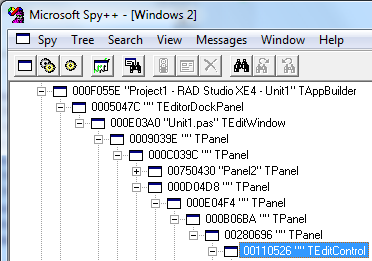
An instance of TEditControl seen inside the IDE.

There is a single instance of the edit control shared by all source code tabs in the main IDE window - the tabs are more like a TTabControl than a TPageControl.  However, you can have multiple edit windows, each with an edit control, even showing the same source code.

The relationship between TEditControls and the documented OTAPI interfaces, such as IOTAEditView, can get complicated and will be addressed in another article.

But how do you find this control and paint on it?

Painting unsuccessfully: by hooking messages


I tried a number of techniques that didn't work and I won't delve into great detail.  My rough approach was to hook the window messages or events related to painting, and also to scrolling or other events in order to update internal information in my own plugins.

For example, I tried setting the control's WindowProc to my own, in order to catch WM_PAINT messages - none were caught.  You could also try finding an OnPaint event or similar.  I also tried catching WM_HSCROLL and WM_VSCROLL messages via WindowProc, installing an application OnMessage handler (note if you try this approach that it uses a multicast event dispatcher, so don't assign your OnMessage event to Application.OnMessage directly), and installing a message hook, and none of those methods caught those messages either.  I don't know why: it's possible that I was hooking the wrong control (despite it being the edit control) or that the messages are handled somewhere else.  I don't know the internal structure of how the IDE interacts with the edit controls.

I would recommend you do not go down this road, since I had no success with this or several variations of it.  (That's one short sentence that describes quite a bit of spent time.)

To do any of these, you also need to find instances of the edit control itself, wherever it is (or they are) in the IDE, another minor complication.  But it turns out that purely for painting, you don't need to know about any specific instance of the edit control.  Instead...

Painting successfully: patching IDE methods at runtime


One method of implementing painting I had read about online was hooking or patching methods of the IDE classes.  This was referred to obliquely, as 'you can patch the methods', with no details about how.  So figuring out how was my next approach.  There are two steps: how to patch any arbitrary method, and then finding the right method(s) to patch.

How to patch an arbitrary method at runtime


A method has an address: a location in memory at which it starts.  Virtual methods or thunked (eg most Windows API) methods jump to this from another location in a variety of ways.  To patch a specific method, you need to find its true location (following the virtual call or the thunk) and then overwrite the first few bytes of the method itself with a call to jump to your replacement.  If your replacement does everything you want, that's all you need to do, but if you want to call the original implementation as well then you need to replace the bytes you overwrote with their original contents and then call the original method by its original address.

Luckily there are several libraries out there for doing this at runtime in Delphi.

The patching code I use is a variant of Chau Chee Yang's code.  (You could probably also use another, such as the Delphi Detours Library.)  Using it, you can patch a method with code similar to:

  FOriginal := TCodeRedirect.GetActualAddr(...address of a method...);
  FHooked := TCodeRedirect.Create(@FOriginal, @ReplacementMethod);

GetActualAddr is a method that checks for an indirect jump.  I have not investigated the details of how well this handles both virtual methods and WinAPI-style thunked methods - in fact while I know the theory of how both are implemented I'm hazy on the exact details since I've never had to examine them closely.  This code works as-is for the purposes of the patching done here.

My version of the above code includes a bugfix for the Disable method: the code on the linked page attempts to write to memory to patch back the method, but it fails because it does not change the protection of the memory first allowing it to be written to. It also does not re-protect it once written, or flush the instruction cache afterwards.  A simple modification based on Enable gives:

procedure TCodeRedirect.Disable;
var
  OldProtect: Cardinal;
  P: pointer;
  n: NativeUInt;
begin
  if FInjectRec.Jump <> 0 then begin
    // David M - based on Enable()
    P := GetActualAddr(FSourceProc);
    if VirtualProtect(P, SizeOf(TInjectRec), PAGE_EXECUTE_READWRITE, OldProtect) then begin
      WriteProcessMemory(GetCurrentProcess, GetActualAddr(FSourceProc), @FInjectRec, SizeOf(FInjectRec), n);
      VirtualProtect(P, SizeOf(TInjectRec), OldProtect, @OldProtect);
      FlushInstructionCache(GetCurrentProcess, P, SizeOf(TInjectRec));
    end;
  end;
end;


Finding the right method to patch


You can now patch a method on a Delphi class live at runtime.  But which method?

At this point, I started searching through the methods in coreideX.bpl looking for appropriate ones to patch.  It looked like being a long search with many false starts and crashes based on incorrect method prototypes.  But I realised that there are open-source projects which implement editor painting already and they may well use this or another method, and so I looked at one to see how they achieved it: CnPack, which I had already downloaded based on David Heffernan's suggestion for how to keep track of code folding - a topic I will return to in a later article.
Note: I have to thank the authors of CnPack for their code, which helped me solve some problems with my own.  It took me quite some time to figure this out, and I gratefully used their code for reference and help. 
CnPack does indeed patch IDE methods - in fact it patches a lot of IDE methods, many more than just this one.  They patch one in particular, though: not a generic paint method for the control, but a method PaintLine - which looked perfect, since the purpose of painting on the edit control is (probably) to paint on specific lines of code, not to paint 'in general'.

Remember, patching the TEditControl.PaintLine method means that whenever any instance of TEditControl tries to paint a line it calls your implementation instead of its own.  You don't need to know about specific instantiations, just the class, because you are writing a replacement method for the class.  Your method will then call into the original patched-out code, in order to draw normally, as well as performing whatever painting it wants to do.

Note: this is completely unsupported by Embarcadero (or me.)  Their internal code can change at any time, even in the one version of the IDE.  Nevertheless, this specific method seems to be stable since at least Delphi 2010.  CnPack has a number of different method prototypes for different versions of the IDE, so this has changed in the past and may in the future.

The method in question is Editorcontrol.TCustomEditControl.PaintLine.  It resides in coreide*.bpl, such as coreide160.bpl, which is always loaded into the IDE.

PaintLine seen in Dependency Viewer
In the above screenshot, you can see PaintLine in Dependency Viewer with a "mangled" name.  Once demangled via tdump, it is (given in C++ format):

__fastcall Editorcontrol::TCustomEditControl::PaintLine(Ek::TPaintContext&, int, int, int)

We don't know the structure of TPaintContext (which would be very useful) nor the meanings of those three integer parameters (yet; actually CnPack has deciphered two of them.)  Also not shown is the implicit Self parameter.  But this is enough to create a stub.

Hooking PaintLine and using it to paint


We already have a prototype for the method, but in the form of an object method not a standalone procedure.  To hook, we need to define a compatible method with the extra Self parameter:

TPaintLineProc = function(Self: TWinControl; A: Pointer; B, C, D: Integer): Integer; register;

A is a pointer / reference to TPaintContext, which we don't have the definition for so cannot use.  B, C and D are the three int params.  However, the first parameter is the normally-hidden Self parameter; that is, the object on which this method is called.  Note the register calling convention, which so far as I can tell is fastcall by another name.  This allows you to implement an object-oriented method - one called on an object, that is, with a Self parameter - in procedural style.

Create a stub method using this prototype:

function HookedIDEPaintLine(Self: TWinControl; A: Pointer; B, C, D: Integer): Integer;
begin
  // ...
end;

Note: 'Self' here is a TWinControl, since we know that the edit control is a TWinControl descendant, and we can assume that the patch works and will only be called with a TEditControl 'Self' parameter.  You could also make it a TObject and check its type at runtime.  I did this in my first implementation.

To be completely clear, this is not an object method but a plain, non-OO procedure.

And to get it to be called, hook the IDE's method:

var
  FOriginalPaintLine: TPaintLineProc;
  FPaintLineHook : TCodeRedirect;

  ...

  FOriginalPaintLine := TCodeRedirect.GetActualAddr(GetProcAddress(FCoreIDEHandle, '@Editorcontrol@TCustomEditControl@PaintLine$qqrr16Ek@TPaintContextiii'));
  // Patch the code editor's PaintLine to use our method
  FPaintLineHook := TCodeRedirect.Create(@FOriginalPaintLine, @HookedIDEPaintLine);

Note: FCoreIDEHandle is the module handle of coreide*.bpl, loaded into the current process.  Finding this is left as an exercise for the reader, and there are variety of ways.  This method may get you started.

Now, fill in the stub method to call the original method:

function HookedIDEPaintLine(Self: TWinControl; A: Pointer; B, C, D: Integer): Integer;
begin
  FPaintLineHook.Disable;
  try
    Result := FOriginalPaintLine(Self, A, B, C, D);
  finally
    FPaintLineHook.Enable;
  end;
end;

You need to disable the hook before calling through the pointer to the method because otherwise you will recursively call back into your own hooked implementation, because you are calling the address of the patched code that jumps to your method (because that is the address of the real original method, the first few bytes of which were overwritten.)  Unpatch it back to what it was before calling it.

Note: Another exercise for the reader: call back into your own painting class to call your own code, rather than remain in procedural code only.

At this point you have a lot of work complete, but no visible result at all because your hooked method still doesn't do any painting and just calls the original.  To paint, you need a canvas, and luckily we are dealing with VCL controls and know that the edit control is a descendant of TWinControl.
Note: Since Delphi is written in Delphi, you can find out quite a lot of information when debugging the IDE in a second instance of the IDE - one example is inspecting the Self object (the edit control) above if you break in your method.

There is a handy VCL class to represent a canvas on a TWinControl: TControlCanvas.  Create and use one:

  Canvas := TControlCanvas.Create;
  Canvas.Control := Self; // The TEditControl
  Canvas.TextOut(0, 0, 'Hello world');

The results

Voila!  You now have text on the code editor:

Hello world!

Next steps


There are a number of important missing elements that need to be addressed in order to turn this proof-of-concept code into useful code:
  • It always draws at (0, 0), not at the line that is supposedly being painted.  Since this is called for every line, the above 'Hello world' text is actually drawn over itself in the same palce many times, once for each line the code editor paints.  We need to extract the line information and paint at the correct offset down for each line, and correct offset right to handle the code gutter
  • It doesn't have any idea what unit or text it is actually drawing over
  • It doesn't have any idea what lines of text are visible
    • ...and when it does, that is going to have to include handling code folding
Luckily, these are also solvable and the next article will address these problems too.  Until then, consider we have made great progress: we can now paint on the code editor from an IDE plugin!


Why am I investigating these topics?


I'm glad you asked :)

I've used Delphi since it was Turbo Pascal, first as a teenager/student and then over the past decade in action as my day-to-day IDE - including C++ Builder.  There are things about the IDE I wish worked differently: mistakes I keep making because I expect certain behaviour, even though I should know by now it works subtly differently.  There are also features I wish it had, and feature tweaks that would just make it a bit 'slicker', something it needs in order to compare to IDEs like Visual Studio which have a very polished UI.  Polish matters in an application you use all day, both visually and in behaviour.

I run a small Delphi consulting company called Parnassus, through which I solve problems and write good code.  I'm expanding and am writing a family of small IDE plugins, each of which improves the IDE by changing current behaviour or adding new features.  The first of these, the one through which I have learned about the problems and techniques documented in this blog series, is small - it was my learning project - but useful: a new implementation of bookmarks, one much better than the bookmarks in the IDE or GExperts.

Preview of an alpha, pre-release version of Parnassus Bookmarks

It will be available soon, and if you are interested in beta-testing please contact me by email or by commenting below.

Saturday, 3 May 2014

Useful reference about disabling specific compiler warnings

Earlier today while working on an IDE plugin, I got the following compiler warnings:
[dcc32 Warning] W1029 Duplicate constructor 'TLineDifference.CreateEqual' with identical parameters will be inacessible [sic] from C++ 
[dcc32 Warning] W1029 Duplicate constructor 'TLineDifference.CreateAdded' with identical parameters will be inacessible [sic] from C++  
This is caused by a record type having two or more constructors taking the same parameters.  (For interest, the type TLineDifference here represents a single difference in two text files, ie one of many calculated when diff-ing source code, for example.  The type of difference - a line being added, removed or equal - could be a parameter but when using the type in code, it is more readable and clear-in-intent for it to be part of the constructor name.)

In the past I've dealt with C++ compatibility warnings, in code that is not intended for C++ consumption, by making sure the "Project Options > Delphi Compiler > Output - C/C++ > C++ Output file generation" option was set to "DCUs only".  But in this case, it didn't have any effect.  And since the code in question is (a) internal to the BPL and (b) is intended for Delphi use only I wanted to disable the warning.

Enter this very useful blog post on Delphi's Hidden Hints and Warnings.

For each warning code (eg W1029) there is a corresponding name you can use either on the command line or in a {$WARN} directive to enable or disable it, restore it to its default on/off state, or promote it to an error.  For example, using the name for W1029 gives:
{$WARN DUPLICATE_CTOR_DTOR OFF}
The page has a table of code to names - very useful - and some other miscellaneous information.

Some side notes:
  • You have to use the name not the warning code.  I would prefer to write something like {$WARN W1029 OFF} because it's then self-documenting what warning it is that is being blocked, but neither this nor variations of this syntax work.  You must use the name not code.
  • This specific warning, W1029, has to be turned off in the project file not in the unit that generates the warning (in fact, the warning doesn't specific a file or line number.)
  • The blog has a number of other interesting articles on Delphi topics, such as using generics on enumerated types which do not have RTTI.
  • In a 'it's a small world' coincidence, while writing this from Estonia, I believe I knew the blog author Marc ten or more years ago as a friend-of-a-friend when I lived in the same town in Australia.  I don't think either of us knew the other used Delphi.  It is a small world indeed.

Sunday, 26 January 2014

DWS Mandelbrot Explorer Mark II, and random notes about FireMonkey and threads

The DWS Mandelbrot Explorer, which renders tiles generated by Eric Grange's tile server, has been updated.

The following is a braindump of information about the app, about FireMonkey, about threading, and about how they all interrelate. I think some points will be interesting to you.

Miscellaneous things I've learned

  • It turns out that you cannot reliably use two FireMonkey Direct2D TBitmaps in two different threads at the same time. The code had a background thread to download the fractal data and create a tile bitmap, which was then passed to the main thread to draw. (Only one thread accessed each TBitmap at a time, but several threads used independent TBitmaps concurrently.) Sometimes this results in silent failures to update the texture object backing the TBitmap data. The DirectX methods CopyResource and DrawBitmap, and possibly others, can fail.
    I spent a long time investigating this, seeing what I might be able to do to hack in enough thread-awareness into the library that using two theoretically-independent bitmaps at the same time would work. The code is strongly designed around shared objects, used for all operations. I've looked into:
    • Direct3D factories and using the ID2D1MultiThread interface to synchronize (only Windows 7 and up though);
    • the (different) ID3D10Multithread interface for synchronization, which works brilliantly right up until it deadlocks;
    • surface sharing between APIs;
    • DXGI shared surfaces;
    • per-thread instances of render targets and textures;
    • hand-rolled synchronization around specific areas; 
    • ...you name it. Several things have been almost successful but nothing is reliable, and the more I read, especially when there are caveats about certain functionality not working on Vista but only on 7, or only on hardware and not on WARP, the more I understand why it makes sense for the FireMonkey Direct2D canvas implementation not to have even tried to implement it.
      Because of this, there's a lot more processing in the app's main thread, generating the bitmaps as well as just drawing everything onscreen. This is not ideal. It seems FMX apps will unfortunately have to stay away from second-thread graphics processing but this is due to the underlying graphics libraries, specifically here Direct2D. Ie, it's not really FireMonkey's fault. If you really need to, you can use a specific graphics library in your other threads, just don't use lots of plain TCanvases and TBitmaps and expect it to work - keep them in one thread. Graphics32 and VPR might be worth investigating.
  • Also, hacking thread support into a non-threaded library you're not overly familiar with is a hard task. Just saying. Fun though.
  • There seems to be no cross-platform Delphi RTL equivalent of WaitForMultipleObjects. The TEvent class wraps an event, but what happens when you want to wait for two of them? This would make a good open source class, I think (a list of events, with wait methods?) but right now this app's code re-uses one event for several things making it a bit complicated.
  • If you want to interrupt a TIdHTTP downloading (via blocking call TidHTTP.Get), call TIdHTTP.Disconnect. The object seems to be reusable afterwards for a subsequent Get call. I use Disconnect to achieve fast termination of thread downloading when I want to stop the background thread objects and need to wait on them, so need them to stop quickly.
  • The Quartz canvas on OSX is noticeably slower than Direct2D.  I think, without measuring, it might even be slower than GDI+. I am curious why this is and if anyone else has seen the same thing in their FireMonkey apps.
  • TImageControl on OSX does not render correctly when you write to its Bitmap. I traced through the code and am not sure what it's doing - the code looks valid - but I can state that after drawing onto the Bitmap what was displayed onscreen, a blank solid color, was wrong. Since I just needed a canvas to draw on and a control to give mouse events, I ended up just using a TPanel.
  • A FireMonkey TForm is missing some seemingly obvious events: there is no OnClick or OnDblClick.  I shouldn't need a client-aligned panel to give mouse click events, but I did.
  • The look of FireMonkey on Windows has improved greatly since XE2, and is quite close to how native Windows controls / the VCL looks. The following image (click to expand) has exactly the same controls placed in the same position with the same dimensions on a XE2 FMX form, a XE4 FMX form and VCL FMX form.  The XE2 one doesn't look very native; the XE4 one is quite similar to the VCL.

    In some cases I think FireMonkey is better. Look how the TTrackBar's edges align nicely in FireMonkey, for example, but don't in the genuine native control - something that bugs me every time I use the real one.

Notes about the app itself

FireMonkey in practice

  • The point of the app was a write a non-trivial FireMonkey app and see, in practice, what issues arose. I can confidently state I have learned a lot about FireMonkey building this app. That was the goal.
    Has there been anything particularly bad? I don't think so. There were three areas:
    • Bugs: none serious. Graphics performance is easily fixable.
    • Cross-platform: some code is slightly less clear than it could be, because I've stuck to using the cross-platform RTL and FMX only.  (For example, had I been able to drop back to using WaitForMultipleObjects(Ex) some code might have been clearer.)
    • Framework: FireMonkey is different to the VCL, and I limited myself to sticking to it and the Delphi RTL / libraries only rather than using, say, Windows API code. This is no different to learning and using any other framework: the same problems occur learning the .Net libraries, Cocoa, etc.
  • On the whole, FireMonkey is a good framework the details of which you have to learn, like any other. It's backed up by the Delphi RTL which is fairly comprehensive. Put it this way, if you can write a VCL app using Delphi, you can write a FireMonkey one.

Other

  • Finally, thanks to François Piette, who submitted some changes to port from XE2 to XE5. I integrated his changes which improved the code - especially bitmap generation from the downloaded data - greatly. Thanks François!
  • Download version 1.1 or find the source code here. Windows 32, 64 and OSX 32.

Next up will be something completely different.

Wednesday, 24 July 2013

TTransparentCanvas: changing the background color of glowing text

You have probably already seen how to use DrawThemeTextEx on Vista and above to draw text with a white blurry 'glow' effect behind it. It's commonly used when drawing on glass, to ensure that text has enough background contrast to be easily readable. But the API only draws a white glow. What if you want another color?

The glow effect over a coloured background. What
if you want non-white glowing background?
I asked a question on Stack Overflow to see if it was possible to change the background glow colour - after all, the text colour and glow size are both options in the DTTOPTS structure; perhaps there was a way to make the border or shadow options affect the glow. But no-one answered, and from my own research / experiments it appears it's not possible through the API.

Instead, I've coded a method to do this into my TTransparentCanvas open-source library.

If you haven't seen the previous blog posts about it, TTransparentCanvas is a class (or set of classes) to draw transparent, blended shapes and text onto a bitmap or device context using TCanvas-like functions and normal VCL objects like TPen, TBrush, TFont etc. Shapes and text can be composed and blended over each other, and the final result then blended over an existing image.  The code aims to be easy to pick up and use if you are familiar with drawing with TCanvas, and is implemented with pure GDI - that is, no GDI+ or other external libraries are required.

How it's done

The following assumes you have read my previous articles about drawing transparent graphics with pure GDI (Part 1, Part 1½, and Part 2.) Specifically, you should know what premultiplied alpha is and be familiar with the record I use to represent a single transparent pixel, TQuadColor.
A quick explanatory note if you didn't go and meticulously pore over those links - which of course you did :) - is that premultiplied alpha changes the RGB representations of a pixel from 0-255 to that value scaled, or pre-multiplied, by the alpha channel, so with an alpha of 64, a full-white (normally (255, 255, 255)) pixel will have RGB values of (64, 64, 64). A grey pixel of (128, 128, 128) with an alpha value of 64 would have premultiplied RGB values of (32, 32, 32), which still represent the same colourIt's one of the steps done when blending transparent images together, and storing bitmaps in this format saves some calculations. TQuadColor is a simple record representing a 32-bit pixel as union or variant record of four bytes in ABGR order or a 32-bit Cardinal, along with some helpful methods.

TTransparentCanvas draws every shape or text onto an intermediate bitmap. This allows processing of the alpha of that shape before the result is blended onto the 'result' bitmap. This design allows every item drawn to have different transparencies, but also allows other intermediate processing before the drawn item is composed onto the final alpha-aware bitmap result.

It's this intermediate step we can take advantage of. If there's no way to change the background colour in the API, we can do it, effectively, as a post-processing stage by tinting the glowing pixels.

Examining the bitmap

Examining the glowing pixels in the debugger shows that the white transparent pixels are represented as pure white until they are completely transparent, but are of course in premultiplied alpha form. Thus, a pixel right at the edge of the glow may have the ABGR value (2, 2, 2, 2): that is, an alpha of 2, with a full-100%-white value (normally (255, 255, 255) premultiplied by the alpha to give each channel a value of 2.

What about the text? If drawn as black text, they will have full-alpha but black pixels, e.g. ABGR (255, 0, 0, 0.) However, text is anti-aliased: most parts of the text will not be fully black, but a colour between black and white, and it's not even guaranteed the text pixels will have full alpha.

Tinting these pixels

I initially considered tinting the pixels by drawing black text on the white glow, figuring out the relative "whiteness" and "blackness" of each pixel, and using that to interpolate between the user-specified glow and text colours. However, not only is this probably more processing than is required but sub-pixel antialiasing might result in non-uniformly-grey pixels.

A simpler solution is to tint all pixels, both glow and text, to the one colour, and then draw the text over again. Visually, this gives almost the same result with less per-pixel processing - a win.

(Note: the following quotes heavily from my Stack Overflow answer explaining the same material.)

To tint, one can ignore the existing colour of the pixel and instead set any non-zero-alpha pixels to a premultiplied alpha value using the user-specified background colour, based on the existing alpha of the pixel. Loop through your temporary bitmap and set the colour using the existing alpha as an intensity:

// PQuad is a pointer to the first pixel, a TQuadColor (see link, basically a packed struct of ABGR bytes)
for Loop := 0 to FWidth * FHeight - 1 do begin
  if PQuad.Alpha <> 0 then begin
    PQuad.SetFromColorMultAlpha(Color); // Sets the colour, and multiplies the alphas together
  end;
  Inc(PQuad);
end;

The key is PQuad.SetFromColorMultAlpha:

procedure TQuadColor.SetFromColorMultAlpha(const Color: TQuadColor);
var
  MultAlpha : Byte;
begin
  Red := Color.Red;
  Green := Color.Green;
  Blue := Color.Blue;
  MultAlpha := Round(Integer(Alpha) * Integer(Color.Alpha) / 255.0);
  SetAlpha(MultAlpha, MultAlpha / 255.0);
end;

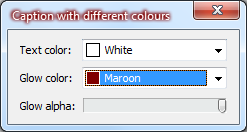
This takes a quad colour (that is, alpha with RGB) and multiplies the two alphas together to get a resulting alpha. This lets you tint by a transparent colour to have the glow effect lessened by being partially transparent at its strongest point if you pass in a non-full-alpha color to tint with. The example application has a slider allowing you to see this in action.

SetAlpha is an existing method that converts to premultiplied alpha:

procedure TQuadColor.SetAlpha(const Transparency: Byte; const PreMult: Single);
begin
  Alpha := Transparency;
  Blue := Trunc(Blue * PreMult);
  Green := Trunc(Green * PreMult);
  Red := Trunc(Red * PreMult);
end;

Example of the result

What does this give you?

This image is the text 'Test glowing text with background color' tinted clLime:
A clLime-tinted glow
The final step is to draw the text over the top again, this time without any glow effect, giving this result:
...and with text drawn over the glow.
This means you can now draw text with any font color and any glow color:
clRed text with a clSkyBlue glow

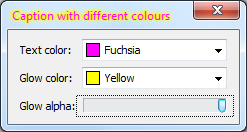
But why stop there? Naturally, the next step is to experiment with custom-drawn title bars. The source demos include a small project heavily based on Chris Rolliston's excellent code to let you draw on a Vista+ title bar. (If you want to custom-draw on a title bar, please go read his article - it's very good - rather than basing your code on my quick-and-dirty hacked-in functionality, which was written only for the purpose of demonstrating using this code with the title bar.) That gives you results like this:


And of course, since TTransparentCanvas can draw to glass as easily as it can to a normal bitmap or DC, you can draw anything else on the title bar too.

Download

TTransparentCanvas is a MPL-licensed open source project hosted on Google Code. Get the source here. If you use it, have feature requests (such as drawing more shapes than are implemented so far) or if you have patches, please let me know. It has been tested with Delphi 2010, XE2 and XE4 and works when compiled to either 32 and 64-bit. Have fun!


Sunday, 21 July 2013

TFireMonkeyContainer update: bugs fixed, features added

The example application showing a 3D FireMonkey form.
On the other tab is a standard 2D form.
On Wednesday I announced TFireMonkeyContainer, a VCL control that can host a FireMonkey form, allowing you to mix FireMonkey elements into your VCL app. It was (and is) a new project, and the announcement page listed several known bugs and possible future design changes.

Bugs: gone! Design changes: made! The current state is not quite perfect but is bug-free enough I feel happy about you using it in real applications, or at least trying it out. (With the caveat that I'm the only one who has tested it so far, and my entire QA department is me :) If you try it, please let me know how it goes.

 Bugs fixed

  • Focus now correctly follows the host VCL and hosted FMX forms
  • Window activation now correctly follows the host VCL and hosted FMX forms, when switching by clicking on the host VCL form, the hosted FMX form, via alt-tab, via the taskbar, and when there are several VCL forms and several hosted FMX forms in the one application.
  • The title bar of host VCL forms correctly changes when the form is active and inactive.
  • An exception is now thrown when two containers both try to host the same form.

Design changes

    This FireMonkey form embedded in the VCL form can't be
    edited in the VCL designer - it's a static preview. Switch
    to the FMX form tab to edit it.
  • Design-time (in the IDE): When a FireMonkey form is hosted in a VCL form in designtime, it shows an uneditable view of the hosted form. (This used to be an editable FireMonkey form, ie you could invoke the FireMonkey designer. This only partially worked and caused a lot of problems.) Switch tabs to the FireMonkey form's IDE design tab to edit the FireMonkey form. Changes will be reflected immediately when you switch back to the VCL form's design tab.
  • There are two new events you can use to control hosting the FireMonkey form. This means there are three ways to embed a FireMonkey form:
    1. Set the FireMonkeyForm property at design-time. (Not recommended, see 'Known problems' below.)
    2. Set the FireMonkeyForm property at runtime.
    3. Use the OnCreateFMXForm and OnDestroyFMXForm events.
      • OnCreateFMXForm fires when the component is first created. It has a var Form parameter which you can use to set the hosted FireMonkey form. If a form was specified at designtime, Form refers to it. If you change it, OnDestroyFMXForm will be called for the old value.
      • OnDestroyFMXForm fires when the component is destroyed. Much like a TForm's OnClose event, you can choose an action to apply to the hosted FMX form, eg to free it. The default is to do nothing, since it was probably created with an owner. The Destroy event also occurs when you change the Form parameter in the Create event (eg, when there was a FMX form set at design-time, but in the Create event you change it to another form.)

Known problems

  • When you set the FireMonkeyForm property at designtime, you can only set it to a FMX form that is open in a tab in the IDE - otherwise the IDE doesn't see it and won't show it in the dropdown in the Object Inspector. When the IDE tab is closed, the reference is invalid - and this means the FireMonkeyForm property is cleared. This might be due to problems mixing VCL and FMX forms in the one app, or (more likely) it might be due to a mistake I've made in how to correctly reference another form in a component. Suggested workaround: set the property at runtime, or use the OnCreateFMXForm and OnDestroyFMXForm events instead.

Notes, and getting the code

The component subclasses both the VCL form and the FMX form in order to catch the WM_NCACTIVATE (VCL form) and WM_ACTIVATE and WM_MOUSEACTIVATE (FMX form) messages. I'm not an expert in window activation and there may be bugs (or I might have just plain written bad code) in the  handlers. I'm also not certain I have hit on completely the right design for the events. I'd quite appreciate feedback if you use the component and feel that the events that occur are a bad design or force you to write ugly code. The same goes for any aspects of the component, really.

You can download the latest version from the Google code homepage and Subversion source checkout.

Wednesday, 17 July 2013

TFireMonkeyContainer - a VCL control for mixing VCL and FMX

I've created a small MPL-licensed component called TFireMonkeyContainer.  It's a VCL control that can host a FireMonkey form - 2D or 3D, it doesn't matter.

This will let you use FireMonkey's swishy graphics, animations, etc in an existing VCL application, either in a form among other controls, or if the host container is client-aligned then as though the whole window is a FireMonkey form (it just happens that the window chrome is a VCL form.)  As far as I know, while lots of people ask about mixing FireMonkey in a VCL app, there are no easy-to-use components which let you do so.  I hope, with some further development and bugfixes, this will do so.

Here's a screenshot from the example app:


How to use

  1. Drop a TFireMonkeyContainer control on a VCL form.
  2. Add a FMX form to your project if you haven't got one already (the IDE makes this difficult; you might need to create it in a separate FMX project and then add the unit to the VCL project.)
  3. At designtime, you can set the FireMonkeyForm property to an existing, auto-created FMX form. Note that for the IDE to see it, the form has to be open in a tab.
  4. At runtime, you can set the FireMonkeyForm property to a new instance of a FMX form.  Note that it doesn't take ownership of the form, so you will need to free the form yourself.  This is something that might change in future.

Known bugs

Yes, there definitely are known bugs.  This version is the result of only a couple of hours' work :)
  • The host form's title bar changes to paint as inactive when you click inside the hosted FMX form.  I plan to fix this by handling WM_NCACTIVATE and related messages; if you can think of a better way, by all means please let me know.
  • At designtime, you can't set the FireMonkeyForm property unless the FMX form is open in a tab in the IDE.
  • At designtime, the embedded FMX form draws a few pixels to the right and below where it should be.  You will see a border on the top and left sides of the controls.  I don't know why this is, and at runtime it is in the right place.
  • Designtime is fairly strange all around.  You can edit the hosted FMX control, such as by dragging a button around, but trying to do something like open a style editor causes lots of problems.  I'd recommend you regard it as view-only.

Possible future changes

This code is the result of one or two hours' work - it's early.  Please take that into account.  I thought it might be worth getting feedback on the component and see if it's useful before doing much more work.
That said, here are some possible future changes:
  • Make designtime view-only - don't let you edit the FMX form when it's displayed at designtime in the VCL editor, and just draw it there instead so you can see what it will look like.  This would probably make it a lot more stable.
  • Take ownership of the FMX form - set and forget.  (Currently, you have to delete the FMX form instance if you don't want a memory leak.)
  • Add two events for runtime form creation and deletion, so that when the component is created, you can handle an event and create a new FMX form, and when it is destroyed you can optionally do something with the FMX form before it is freed, or stop it being freed entirely.
I'm interested in other ideas too!

Credits

I saw some example code linked from this Delphi Sorcery post which inspired this component.  The code was DSharp.Windows.FMXAdapter.pas by Stefan Glienke.  My code is considerably expanded so I view it as a separate work - it solves some bugs (eg, removing flicker when the host VCL form is resized, hiding the phantom FMX application window, etc) and of course is a component.  Thanks go to those two pages for showing the basic technique!

Getting the code

You can grab the code via Subversion from Google Code here:
http://firemonkey-container.googlecode.com/svn/trunk/
or via the command line:
svn checkout http://firemonkey-container.googlecode.com/svn/trunk/ firemonkey-container-read-only

You will find two packages (one designtime, one runtime - both 32 and 64-bit) and one small example project.  It's only been tested with XE4 so far!

Have fun, and please contribute back any bugfixes you find.

Wednesday, 7 March 2012

Transparent graphics with pure GDI (Part 2) - and introducing the TTransparentCanvas class

This is part 2 of a short series that examines alpha-aware graphics using native GDI only - not GDI+, not DirectX, and not with any other custom non-GDI graphics implementation.

This post will cover:
  • Non-rectangular drawing
  • Handling GDI's clobbering of the alpha channel
  • Better use of per-pixel alpha (based on what's drawn, which is more useful than a horizontal gradient)
  • Introduction of the TTransparentCanvas class: a TCanvas-like class allowing you to draw rectangles, ellipses, text etc as you normally would, including using TPen, TBrush and TFont.  It composes the layers of drawing as you go, building a per-pixel alpha-aware image.  It also allows you to draw on glass - something VCL applications traditionally have trouble with.
Previous posts in the series:
If you're not very familiar with GDI and alpha transparency on Windows, including the intricacies of using AlphaBlend and its BLENDFUNCTION parameter, please (re-)read those before continuing.  Content in this post refers to classes and techniques introduced in the first two articles.

Thursday, 13 October 2011

Transparent graphics with pure GDI (Part 1)

Transparent graphics are used everywhere these days.  Half the UIs you will have used today will have made some use of composited graphics, overlays, or something similar.  You've probably seen:
  • Selections with transparent rectangles or other shapes
  • Text with a transparent shape behind it, so you can see the through to the background and still clearly read the text
  • Custom drawing on glass, such as text with the blurred white background and custom controls
How do you achieve all of these with Delphi or C++Builder?

This is part 1 of a short series that examines alpha-aware graphics using native GDI only - not GDI+, not DirectX, and not with any other custom non-GDI graphics implementation.  By the end of the series I will have introduced a small alpha-aware canvas class that you can use to draw standard shapes (rectangles, ellipses, etc) just as you can with the normal TCanvas (and using standard TFont, TPen and TBrush objects), to compose several layers of alpha blended graphics together, and to draw on glass on Vista and Windows 7.

This is a screenshot of the demo program which I used to test this class.  It's not the prettiest demo program ever, but you can see all of the above in action in this screenshot:


Tuesday, 6 September 2011

C++ Builder XE2

Welcome!  This is the first article on my new blog, and it examines XE2.  I’ll dig right in:
First impressions
XE2 uses the same installer as previous versions, and has a fairly simple setup process.  For some reason the help uses a separate installer and so installation isn’t ‘set it and forget it’ – you’ll come back thinking it’s done to find you need to click Next a couple of times and wait for another five minutes.
The first thing I noticed when installing is that the installation components include a cross-platform option!  This is a promising start.  More on cross-compilation below.
When installed, the IDE starts up much faster than 2010.  To be fair, I’ve installed C++Builder XE2 and am comparing it to RAD Studio 2010, so it is probably missing a lot of the packages that the full RAD Studio includes.  The IDE looks identical to 2010 (the last version I used.)  It still uses plain Windows styles.  I’ve been hoping for it to look a little jazzier sometime – Visual Studio is visually very slick, and people, even programmers, do form impressions based on looks.  Embarcadero (then Codegear) played with this briefly for 2006 and 2007, when the toolbars in the IDE were rounded Office-style.  Unfortunately they moved back to unthemed controls.  The new VCL styles provided in XE2 (more on these below) provide a good opportunity for easy slickification of the base IDE, and using them in the IDE would have been a good demonstration of the versatility and robustness of the style engine.